
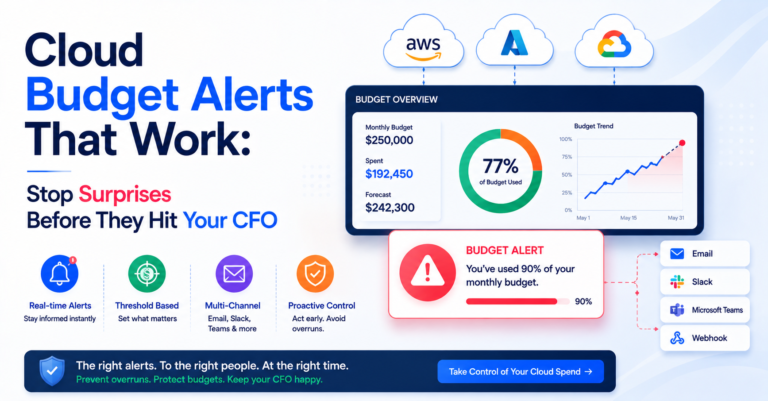
Most cloud budget alerts fail for one specific reason: the threshold fires at the point of failure instead of the point where action is still possible. A budget alert fires at 100% of the monthly limit, on the last day of the month, informing the team they’ve already spent everything they had. Technically, the alert worked — it fired. Practically, it was useless, because there was nothing left to do about it.
Table of Contents
Why Most Cloud Budget Alerts Fail to Prevent Anything
Native cloud budget alerts (AWS Budgets, Azure Cost Alerts, GCP Budget Alerts) are easy to set up and almost universally configured the same unhelpful way: a single alert at 80% or 100% of a monthly budget. This catches the fact that you’ve overspent. It does nothing to catch the trend while there’s still time to intervene. Three specific failures show up repeatedly:
- Single-threshold alerts that only fire once, near or at the limit, instead of providing an early warning while spend is still trending toward it.
- Static thresholds that don’t account for legitimate growth — a budget set for last year’s usage generates constant false alarms as the business scales, training teams to ignore alerts entirely.
- No context on why the alert fired — a notification that says “you’re over budget” without identifying which service or team drove the spike leaves the recipient to start an investigation from zero.
What Cloud Budget Alerts That Actually Work Look Like
| Feature | What it does | Why it matters |
|---|---|---|
| Tiered budget thresholds | Early alert at 50% of pace-adjusted spend, mid alert at 75%, late alert at 90%+ | Gives teams a chance to course-correct instead of just documenting the overrun after it happens |
| Anomaly-based alerts | Catches “your spend jumped 40% in three days,” not just “you’re near your limit” | Cost anomaly detection flags problems — a misconfigured autoscaler, a runaway job — that happen well within budget but still signal trouble |
| Team/service scoping | Routes the alert to whoever can actually act on it, not just finance | A company-wide alert tells finance something is wrong; it doesn’t tell the engineer who can fix it |
| Context in the alert itself | “Spend is up 30% this week, driven primarily by EC2 in staging” | Actionable detail beats “you are over budget,” which just triggers an investigation from zero |
Setting Cloud Budget Alerts on Pace-Adjusted Spend, Not Raw Percentage
Budget thresholds should be based on pace-adjusted spend — comparing current trend against the full-period budget — not just a raw percentage of the total. A team at 60% of budget on day 10 of a 30-day month isn’t ahead of pace; they’re on track to spend double their budget if the trend continues. Threshold logic that accounts for time-in-period catches this kind of trend early instead of waiting for the raw percentage to cross an arbitrary line. For the broader guardrail system budget alerts fit inside, see the cloud governance framework, and for the tagging accuracy this kind of team-level scoping depends on, see cloud tag management.
Cloud Budget Alerts Across Multiple Providers
Running AWS, Azure, and GCP simultaneously means AWS Budgets, Azure Cost Alerts, and GCP Budget Alerts each fire independently, on their own thresholds, with no shared view of total spend — the same fragmentation problem covered in multi-cloud cost management. A team can be well within budget on each individual cloud while significantly over budget in aggregate, and none of the three native alerting systems will ever catch that. If you’re still deciding whether the complexity of multi-provider alerting is worth it, see multi-cloud vs single cloud.
Getting Ahead of the CFO Conversation
The goal of cloud budget alerts isn’t compliance theater — it’s making sure the first person to notice a spend problem is someone who can fix it, not the CFO reading a surprise invoice. CloudPi, a multi-cloud cost management and governance platform, provides tiered, anomaly-aware budget alerts with team-level scoping and context across AWS, Azure, and GCP — so the surprise gets caught while it’s still small enough to fix quietly.
Frequently Asked Questions
Why don’t native cloud budget alerts prevent overspending?
Because most are configured as a single threshold at 80% or 100% of the monthly budget, which only confirms overspending has already happened rather than catching the trend while there’s still time to intervene.
What makes a cloud budget alert actionable instead of just informational?
Including context in the alert itself — which service or team drove the spike, and by how much — rather than a generic “you are over budget” notification that forces the recipient to start an investigation from zero.
What’s the difference between threshold-based and anomaly-based alerts?
Threshold-based alerts catch “you’re approaching your budget limit.” Cost anomaly detection catches sudden spend spikes, like a 40% jump in three days, that can happen well within budget but still signal a real problem.
Why should budget thresholds be pace-adjusted instead of a raw percentage?
Because a team at 60% of budget on day 10 of a 30-day month isn’t ahead of pace — they’re on track to spend double their budget if the trend continues. Pace-adjusted thresholds catch that trend early instead of waiting for a raw percentage to cross an arbitrary line.
How should cloud budget alerts be scoped for a multi-team organization?
To the specific team, service, or environment driving the spend, not just company-wide. A company-wide alert tells finance something is wrong; a properly scoped alert tells the engineer who can actually fix it.