
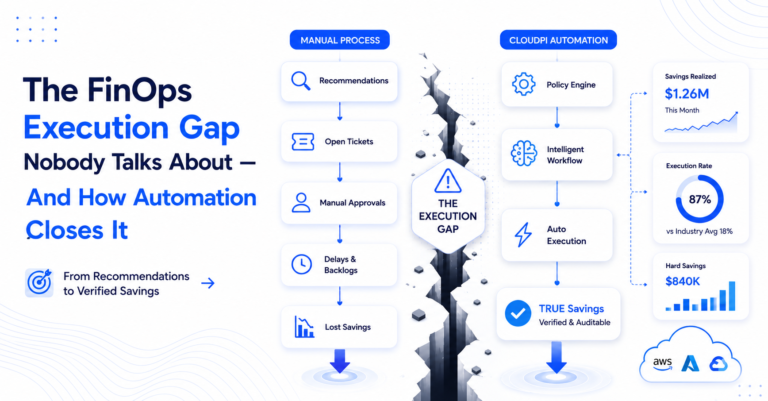
The FinOps Execution Gap Nobody Talks About — And How Automation Closes It
Most FinOps teams act on fewer than 30% of the optimization recommendations their tools generate each month.
The other 70% expire. The resources stay provisioned. The bill arrives with the same line items, slightly larger. The process repeats.
This is not a data problem. Cloud cost management platforms have gotten very good at surfacing waste. The problem is the distance between a recommendation and an action — and everything that lives in that gap: unclear ownership, slow approvals, engineering backlogs, and a review process that requires the same human judgment for the fortieth routine decision this quarter.
FinOps workflow automation exists to close that gap. This piece explains how — specifically, what a three-tier policy model looks like and why the tier structure matters more than the automation itself.
Why Better Dashboards Don’t Solve the Execution Gap
The FinOps execution gap is not a visibility problem.
A typical mid-scale engineering org running $1–5M/month in cloud spend can tell you, with reasonable accuracy, where their waste is. They have a dashboard. They run weekly reviews. They generate recommendations.
What they cannot do is act on all of them — or even most of them — before the next review cycle.
Here is what that looks like in practice:
A FinOps engineer exports 47 recommendations to a spreadsheet. She tags each one with an owner. She files Jira tickets. She follows up on the tickets from three weeks ago that haven’t moved. She has a conversation with an infrastructure lead who wants more context before approving a rightsizing change on a production database. She realizes four of the flagged resources have no identifiable owner.
Two weeks pass. The bill arrives. Half the items are still open.
The bottleneck is not knowledge — it’s execution velocity. And execution velocity is a process and automation design problem, not a reporting problem. More dashboards make the gap more visible. Only FinOps Workflow Automation actually closes it.
The Policy-First Approach to FinOps Workflow Automation
The shift that matters is treating cloud cost optimization the way mature engineering teams treat operational runbooks: not as a list of things to do, but as a set of conditions and responses that execute without requiring a human decision every single time.
The model is straightforward:
- A trigger — what condition fires the policy (idle for N days, utilization below X%, resource matching a pattern)
- A scope — how much human oversight this specific action warrants
- An action — what the system does when the trigger fires
The scope is the part most automation systems flatten. They default to full automation or full manual review, with nothing in between. Real optimization work doesn’t fit that binary. Some actions are obviously safe and should execute automatically. Some need a human because the stakes are high. Some should intercept the problem before it exists at all.
A mature FinOps workflow automation configuration uses all three tiers — not as alternatives, but as layers covering different parts of the optimization lifecycle.This is what mature FinOps Workflow Automation looks like in practice — three tiers, one lifecycle.
Three Automation Scopes for Every Optimization Type
Auto Savings: Zero-Touch Execution for Low-Risk Actions
Auto Savings is for the decisions where the answer is already known.
Idle EC2 instances in dev accounts that haven’t been accessed in 45 days. Unattached EBS volumes with no snapshot dependency. ECS services running at minimum capacity in non-production environments overnight.
These are not ambiguous. They do not require approval. They require execution — consistently, and often.
A team doing manual weekly reviews captures roughly 60% of these opportunities. They miss the ones that appeared mid-week, the ones that got lost in the ticket queue, the ones that nobody remembered to close out. Auto Savings captures 100%, on the schedule the policy defines, without a spreadsheet and without a ticket.
Each execution is logged and attributed to the specific policy that triggered it, which means the saving is verifiable — not estimated. That distinction matters when finance asks for evidence. This is automated cloud cost optimization in its purest form: no ticket, no reviewer, no delay.That’s FinOps Workflow Automation removing effort, not judgment.
Gated Savings: Human-in-the-Loop for Production Workloads
Production workloads are a different story.
Rightsizing a database instance that serves a payment processing API is not the same as stopping an idle dev server. The saving may be real and significant. The risk of miscalculation — latency spikes, connection exhaustion, unexpected behavior under load — is also real. That action needs a human in the loop.
What it doesn’t need is a process that takes three weeks.
Gated Savings routes each recommendation to a designated approver the moment it becomes actionable. The approver receives one decision — not a dashboard, not a spreadsheet — with full context pre-filled: the resource, the proposed change, the projected saving, the risk factors already assessed by the platform.
Three outcomes are possible:
- Approve → the action executes immediately
- Defer → it routes back with a timestamp for follow-up
- Reject → it closes with a reason that improves future policy tuning
The approval step exists to protect reliability. But the system is designed so that approval is a checkpoint — not a bottleneck. When an engineering lead’s queue contains five recommendations that actually warrant review, instead of 47 items of mixed importance, the quality of the decision improves. The context is there. The ask is specific. The decision takes minutes, not weeks. This is cloud cost governance applied through FinOps Workflow Automation, not buried in a quarterly audit.
Cost Avoidance: Shift FinOps Left to Provisioning
Auto Savings and Gated Savings both operate on existing resources — they are reactive, even when fast. Cost Avoidance moves the control point earlier: to provisioning and deployment, where a decision can still be changed for free.
Cost Avoidance policies scan for patterns that will create cost problems before those patterns are committed:
- Instance types above approved tiers being provisioned in dev accounts
- New S3 buckets without lifecycle policies
- Workloads deploying to regions that lack cost tagging enforcement
- Reserved capacity being released without replacement analysis
When a pattern matches, the policy can flag it, block it, or route it for review — depending on severity and the team’s tolerance for friction at the provisioning layer.
This is FinOps shifted left. Instead of cleaning up the bill after it lands, you build cost discipline into the deployment process itself. The cheapest cloud spend is the spend that never happens — and that’s cloud cost automation doing its job before a dollar is ever committed.
| Scope | Trigger Point | Human Involvement | Designed For |
|---|---|---|---|
| Auto Savings | Post-provisioning, on condition | None | Low-risk, repeatable, high-frequency |
| Gated Savings | Post-recommendation, pre-action | Required, routed to owner | Production, risk-sensitive, cross-team |
| Cost Avoidance | Pre-provisioning | Optional, configurable | Dev governance, deployment guardrails |
The three scopes are not alternatives. They are layers. A mature Intelligent Workflows configuration uses all three: Auto Savings handles the obvious, Gated Savings handles the sensitive, Cost Avoidance stops the avoidable.A Real-World Workflow Configuration
A platform engineering team managing roughly $2M/month in AWS and Azure spend might configure this as follows:
Auto Savings policies:
- Stop any EC2 instance in dev/test accounts with CPU utilization below 5% for 72 consecutive hours
- Delete unattached EBS volumes older than 30 days with no snapshot dependency
- Scale ECS services to zero in non-production environments between 8 PM and 6 AM on weekdays
Gated Savings policies:
- Route all rightsizing recommendations for production RDS instances to the infrastructure lead, batched Monday mornings
- Send any recommendation exceeding $5,000/month projected saving to the FinOps lead and the relevant engineering manager for co-approval
Cost Avoidance policies:
- Block EC2 instance launches above m5.2xlarge in dev accounts without a cost-approved tag
- Flag any new resource created in us-east-1 without required cost allocation tags (environment, team, project)
- Alert on any new NAT Gateway provisioned outside an approved architecture review
Three policy types. One lifecycle covered — from provisioning to decommission. Together they form a working example of multi-cloud cost management applied consistently across AWS and Azure, not siloed per provider.
What Changes When Intelligent Workflows Run
FinOps Workflow Automation produces two measurable changes.The operational change is measurable in two places.
First, the recommendation backlog shrinks. Low-risk items execute automatically within hours of being identified. The spreadsheet gets shorter because the work is already done. The queue that used to represent two weeks of manual effort becomes a log of completed actions.
Second, high-value decisions get better attention. When an engineering lead’s approval queue contains only five recommendations that warrant review — not 47 items of mixed risk and importance — the quality of the decision improves. Context is there. The ask is specific. The saving either gets captured or gets explicitly deferred, with a reason on record.
The FinOps execution gap is not a tooling problem. It is an automation and process design problem. FinOps Workflow Automation answers that problem — not by removing human judgment where it matters, but by removing human effort where it doesn’t. As part of a broader FinOps platform, this is what cloud cost optimization looks like when it’s operational rather than aspirational.
Frequently Asked Questions
How is this different from cloud-native automation tools like AWS Config or Azure Policy?
Cloud-native tools operate within a single provider and primarily handle compliance and configuration enforcement. They don’t aggregate cross-cloud recommendations, provide savings attribution, or route approvals to FinOps owners. Unlike single-provider tools, FinOps Workflow Automation covers the full lifecycle the provider layer and covers the full multi-cloud cost management lifecycle.
Does configuring intelligent workflows require engineering involvement?
The policy builder is designed for FinOps practitioners, not engineers. Setting up an Auto Savings policy for idle dev resources — trigger condition, scope, action — takes under ten minutes in the UI. Gated Savings routing rules require knowing who the designated approver is. Cost Avoidance policies for tag enforcement or instance tier limits typically need a quick alignment call with a platform engineer, but not ongoing engineering support.
How does Gated Savings avoid becoming another approval bottleneck?
This is core to how FinOps Workflow Automation stays usable at scale.Three design decisions prevent bottlenecks: approvers receive a single pre-contextualized decision (not a queue to manage), approvals are scoped to roles rather than individuals (so coverage doesn’t break when someone is out), and deferred items have timestamps and automatic follow-up routing. The system treats approval as a checkpoint with accountability, not an inbox to monitor.
Can I start with one policy type and expand later?
Yes. The recommended starting point is one Auto Savings policy for idle dev resources. Run it for two weeks, review what executed, verify the savings are attributed correctly. Then add a Gated policy for your first production rightsizing recommendation. Then define one Cost Avoidance rule for your most common provisioning mistake. Three policies is enough to change how the team spends its time.
How are automated savings verified rather than estimated?
Each policy execution is logged with the specific action taken, the resource affected, the timestamp, and the cost impact calculated against baseline. CloudPi’s TRUE Savings engine attributes these executions to the policy that triggered them, producing a verified savings figure rather than a projected one. Finance can trace any saving to the specific automated action that produced it.
Getting Started
Getting started with FinOps Workflow Automation takes three policies, not a platform overhaul. Intelligent Workflows is live in CloudPi now.
Start with one Auto Savings policy — idle dev resources is the easiest entry point with the lowest operational risk. Set the condition, set the action, run it for two weeks. Review the execution log and the attributed savings.
Then add a Gated policy for your first production rightsizing recommendation.
Then define one Cost Avoidance rule for your most common provisioning mistake.
Three policies. That’s enough to change how your team spends its time.
Workflows → Policies → New Policy.
CloudPi is a multi-cloud FinOps platform for teams that need cost visibility, governance, and automated optimization across AWS, Azure, and GCP. Intelligent Workflows is one part of a broader system that includes TRUE Savings attribution, automated cost assignment, and multi-cloud billing analysis wall built around FinOps Workflow Automation as its operating model.
View comments (1)